How to Delete Your Account
You can permanently delete your account directly from the application by following the steps below.
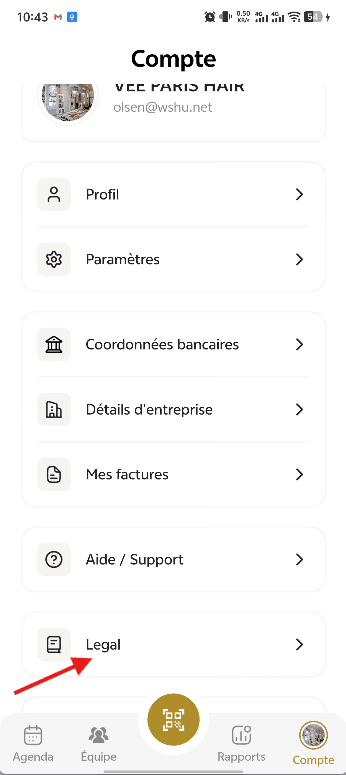
Step 1: Open the Account Section
Open the app and go to the Account tab from the bottom navigation bar. Scroll down and tap on Legal.
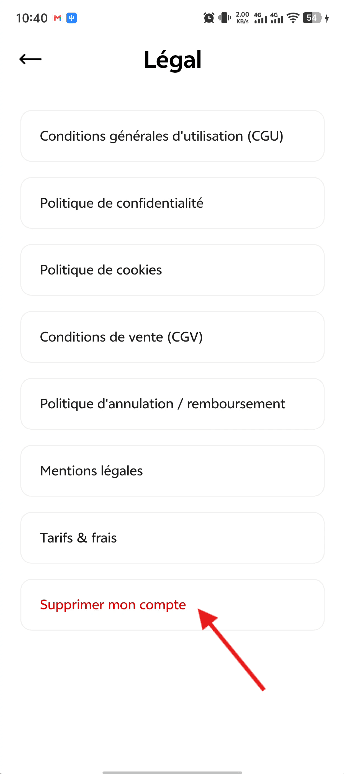
Step 2: Open the Delete Account Option
On the Legal screen, scroll to the bottom of the page. Tap on Delete My Account.
Step 3: Submit an Account Deletion Request
After tapping Delete My Account, you will be redirected to our website. Complete the account deletion request form with the required information and submit your request.
Step 4: Admin Review
Once your request is submitted, our administrative team will review it and verify the necessary information.
Step 5: Permanent Account Deletion
After the request has been reviewed and approved, your account and associated account data will be permanently deleted.
Note: Account deletion is not immediate. Your account will only be permanently deleted after the submitted request has been reviewed and approved by the administrative team.